Wingdings Alphabet Chart
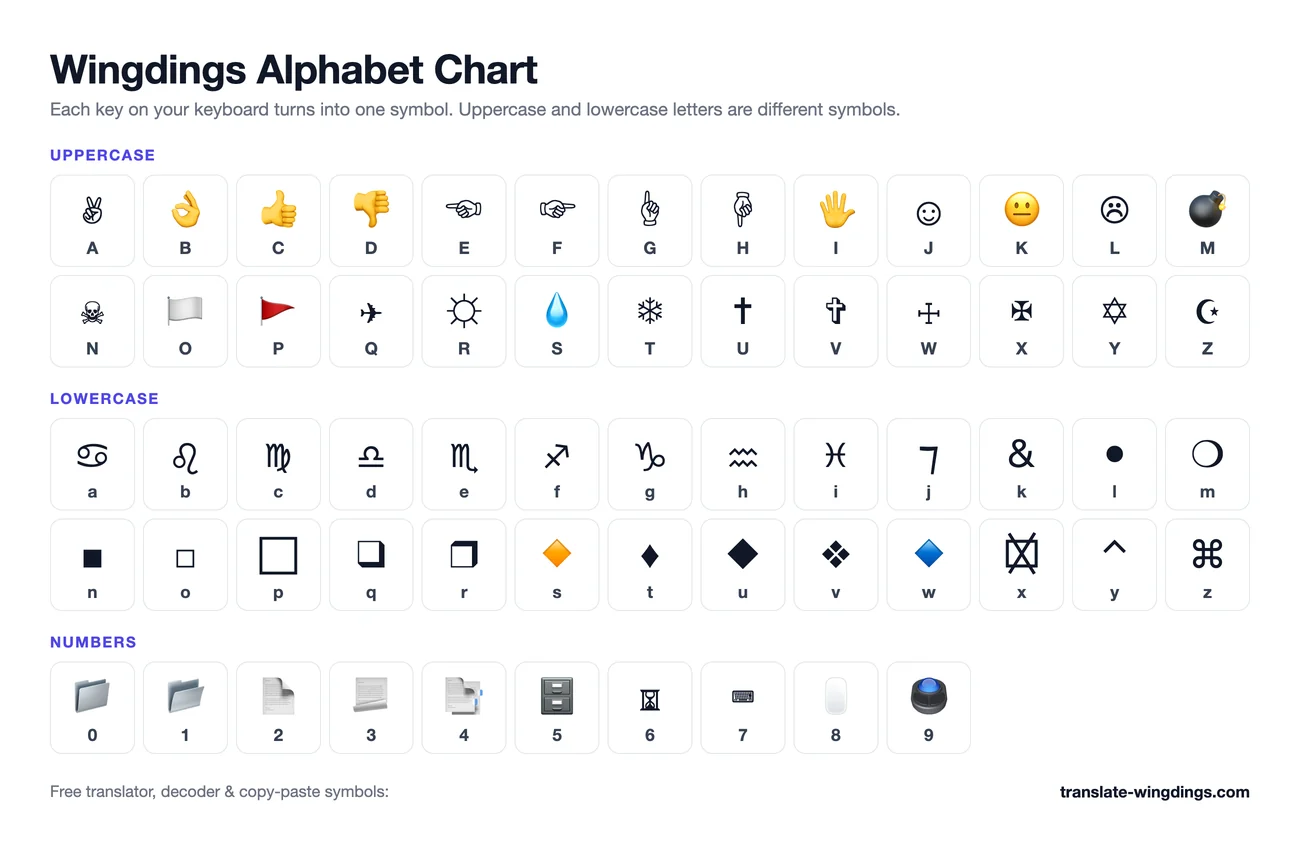
The complete Wingdings alphabet: every key from A–Z, a–z, 0–9 and punctuation with the symbol it produces and its Unicode code point. Click any symbol to copy it, print the page for reference, or download the whole chart as a PNG.
Wingdings Uppercase Letters (A–Z)
Every uppercase letter produces a distinct symbol — hands, gestures and pictographs. Click to copy.
Wingdings Lowercase Letters (a–z)
Lowercase letters give a completely different set — zodiac signs, geometric shapes and icons. Click to copy.
Wingdings Numbers (0–9)
Numbers become tools, timepieces and small objects in classic Wingdings. Click to copy.
Wingdings Punctuation & Special Keys
Punctuation and special keys hold some of the most-used Wingdings symbols, including mail, scissors and clocks. Click to copy.
Printable Wingdings Alphabet Chart
Need the whole Wingdings alphabet on one page? Download this chart as a high-resolution PNG and print it, add it to a worksheet or escape-room puzzle, or share it with your Undertale group chat. It shows every uppercase letter, lowercase letter and number next to its Wingdings symbol, exactly as this translator outputs them.
How the Wingdings Alphabet Works
Wingdings is not an alphabet in the linguistic sense — it is a font where each key on your keyboard is reassigned to a picture. The underlying text stays exactly the same: if you type "HELLO" and switch the font to Wingdings, the document still contains the letters H, E, L, L, O. That is why the chart above lists a "key" for every symbol: the symbol is that key, wearing a costume.
Each cell also shows the Unicode code point. When you copy from this page you get that Unicode character, not the Microsoft font glyph — so the person on the other end sees the same symbol whether they use Windows, Mac, iPhone or Android, with no fonts to install. Unicode added official Wingdings compatibility characters in version 7.0 (2014), but many of them still have no glyph on iPhones and Macs, so for those keys we pick the closest symbol every device can draw.
Related charts you might need: Wingdings 2 (checks and boxes), Wingdings 3 (arrows), and Webdings (web-era icons). For specific looks, see the Wingdings checkmark, heart, arrows and star pages.
Frequently Asked Questions
▸How many symbols are in the Wingdings alphabet?
The Wingdings font covers 224 character positions (0x20–0xFF). Almost all of them are pictures: 52 letter symbols (26 uppercase + 26 lowercase), 10 digits and more than 150 punctuation and accented-character symbols.
▸Are uppercase and lowercase Wingdings symbols different?
Yes. Wingdings maps uppercase and lowercase keys to completely different symbols. For example, J is a smiling face ☺ while j is a frowning face, and T is a snowflake while t is a different star. When decoding, case matters as much as it does in normal English.
▸How do I copy Wingdings symbols from this chart?
Click any cell. The symbol is copied to your clipboard as a standard Unicode character, so you can paste it into Word, Discord, Instagram, emails or anywhere else — no Wingdings font required on the receiving end.
▸Can I print the Wingdings alphabet chart?
Yes. Click “Print” above any table for a clean printable version, or “Download PNG” to save the chart as an image — handy for classrooms, puzzle games and reference posters.
▸What Unicode characters do these symbols use?
Each symbol is a standard Unicode character (for example J = U+263A WHITE SMILING FACE). Where Unicode's official Wingdings compatibility character isn't drawn by phone and computer system fonts yet, we use the closest widely supported symbol instead, so what you copy never turns into empty boxes. Our decoder accepts both versions.